
This is a continuation of the Intro to Design Thinking post series:
- Part 1 explains what Design Thinking is and why you should care. It also delves into the EMPATHIZE stage with a focus on customer research
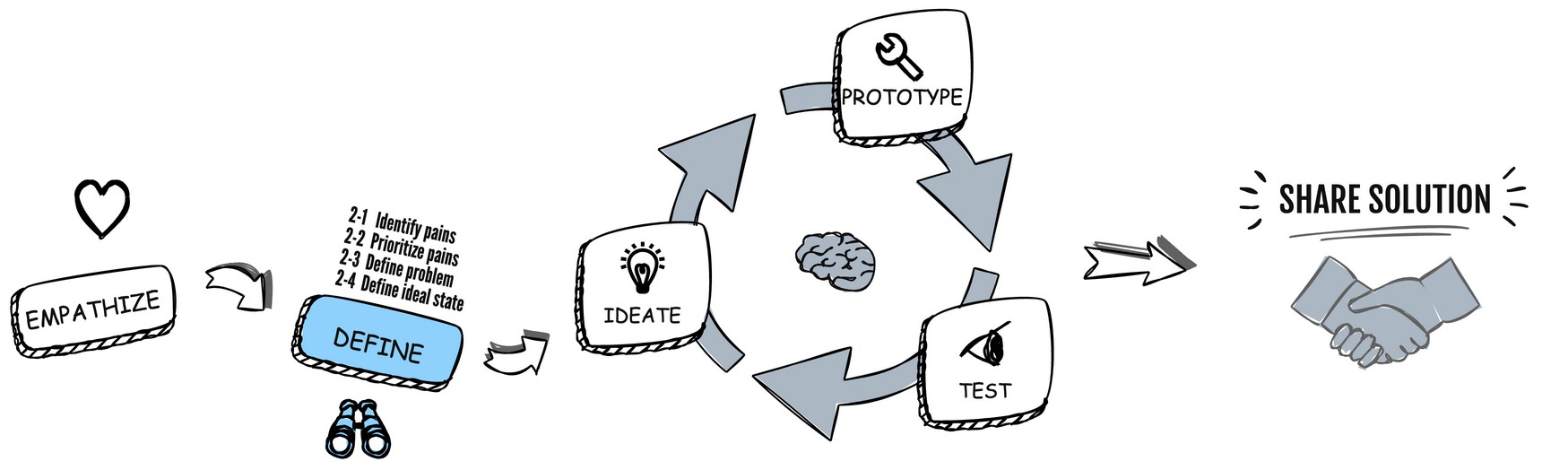
This post dives into the DEFINE stage which is the second stage of the Design Thinking Process.
Stage 2 – Define
What is it?
The DEFINE stage is the second stage of the design thinking process, and it’s all about defining the problem you’re trying to solve. In this stage, you take the insights and empathy gained from the empathize stage and use them to frame the problem in a clear and concise way.
Why do it?
The DEFINE stage is important because it helps you to create a focused problem statement that will guide the rest of the design process. Without a clear definition of the problem, it’s easy to get sidetracked or develop solutions that don’t meet the needs of your users.
What are the inputs?
The inputs for the define stage include:
- The insights and empathy gained from the EMPATHIZE stage
- Data and analytics related to the problem you’re trying to solve
- Feedback and complaints from users related to the problem
- Market research and competitor analysis
What are the outcomes?
The outcomes of the DEFINE stage include:
- A clear and concise problem statement that frames the design challenge
- A clear and concise ideal state of the problem that frames the vision
- A shared understanding of the problem among team members and stakeholders
- Prioritized design criteria and constraints
- An initial set of design principles and hypotheses to guide ideation
What are the tools and techniques to use?
Some of the most common tools and techniques used in the DEFINE stage include:
- Stakeholder mapping: This tool helps to identify the key stakeholders and their interests and perspectives related to the problem.
- Affinity mapping: This tool helps to cluster and organize the insights and data gathered from the empathize stage in a meaningful way.
- Go Broad to Go Narrow – This is a strategy that involves starting with a broad or general understanding of a topic or problem, and then gradually narrowing down the focus to a specific aspect or solution. This approach helps in considering a range of possibilities before zooming in on the best option.
- Problem statement: This is an unambiguous and brief declaration that shapes the design task, ensuring it is specific, meaningful, capable of being acted upon, and unbiased towards a particular solution.
- Ideal state: An illustration of a prospective scenario, aspiration or dream in which a significant customer problem or opportunity has been addressed so remarkably that the resulting situation could be perceived as nearly impossible.
- Design criteria and constraints: These are the parameters and requirements that will guide the design process, such as budget, timeline, technical feasibility, and user needs.
- Hypothesis generation: This involves generating a set of assumptions and hypotheses about the problem and potential solutions, which will guide ideation and prototyping.
Stakeholder Mapping
Stakeholder mapping is a process used to identify, analyze, and prioritize the various stakeholders involved in a project. It helps technologists and product / project managers to understand and manage the expectations, needs, and interests of different individuals or groups who have a vested interest in the project’s success. This process is essential for effective communication, decision-making, and ensuring the project meets its objectives.
The key steps in stakeholder mapping include:
- Identification: List all potential stakeholders who may be affected by or have an influence on the project. Stakeholders can include team members, colleagues and XFNs (other stakeholders like data scientists, analysts, business and operations people, other engineers etc.), customers and end-users, management, vendors, regulatory bodies, and any other individuals or groups with a direct or indirect interest in the project.
- Categorization: Classify the stakeholders based on their level of influence and interest in the project. This can help you understand the power dynamics and potential impact each stakeholder has on the project. A common method is to use a Power / Interest Grid, which categorizes stakeholders into four groups as described below:

- Analysis: Assess each stakeholder’s needs, expectations, and potential impact on the project. Consider factors such as their goals, motivations, and any potential conflicts of interest. This will help you to anticipate and address any issues that may arise during the project’s lifecycle.
- Prioritization: Based on your analysis, prioritize the stakeholders by their level of importance and influence. This will help you determine which stakeholders require more attention, communication, and engagement throughout the project.
- Engagement planning: Develop a communication and engagement strategy for each stakeholder group. This should outline the frequency, methods, and content of communication, as well as the appropriate level of involvement for each stakeholder in the project’s decision-making process.
Stakeholder mapping will ultimately help you to improve the project’s chances of success and create a more collaborative and inclusive working environment.
Affinity Mapping
Affinity mapping, also known as affinity diagramming, is a collaborative technique used to organize and analyze qualitative data, such as insights, ideas, or customer pain points, gathered from research like “follow me home” customer observation sessions (described in Part 1). It helps teams identify patterns, themes, and relationships within the data, which can then be used to define a clear problem statement and guide the project’s direction.

For this article series let’s assume a hypothetic case study about HealthTech startup:
Background: A Silicon Valley startup SpineAlign, recognized an increasing problem: more and more people were suffering from bad posture due to prolonged sitting and usage of computers and smartphones. The startup began by conducting surveys and interviews with people who had identified poor posture as a concern. They observed people in their daily routines at home and the office, looking at how they sat, stood, and interacted with their devices. They discovered that people were often unaware of their poor posture and lacked the right tools and knowledge to correct it. The team came up with an idea to develop a wearable device that alerts users when they have poor posture, an interactive app providing corrective exercises, and an educational platform to inform users about the importance of good posture and how to achieve it. The startup produced an initial batch of the wearable devices and distributed them to early adopters group, along with access to the new app. Users were asked to use the product for several weeks and provide feedback.
Result: Initial feedback revealed that users found the device very helpful in making them aware of their posture. The vibrating alert was seen as a useful reminder, and the app’s exercises were considered easy to follow and effective. However, some users found the wearable slightly uncomfortable after prolonged use. Taking this feedback on board, SpineAligned decided to leverage design thinking to create a user-friendly and effective solution.
Here’s how to conduct an affinity mapping session give the SpineAlign story:
- Gather data: Collect all the relevant data from your customer follow-me-home session (described in Part 1), including your observations, insights, feedbacks, and pain points. It’s essential to have a diverse and comprehensive set of data for the accurate analysis.
- Prepare the workspace: Find a large, flat or virtual surface (e.g., a whiteboard, wall or a tool such as Mural or Miro tool where you can place sticky notes or cards. Ensure that all team members have access to the space and can actively participate in the process. I created a special Design Thinking toolkit in Miro to accompany my series of articles so you could use it with your teams and get started.
- Write data points on sticky notes: Write down each data point, observation, or pain point on separate sticky notes or cards. Use concise and clear language for easy understanding.
- Cluster related items: As a team, start grouping the sticky notes based on their similarities or relationships. Encourage open discussion and collaboration among team members during this process. The goal is to create clusters of related items, which will represent themes or patterns within the data.
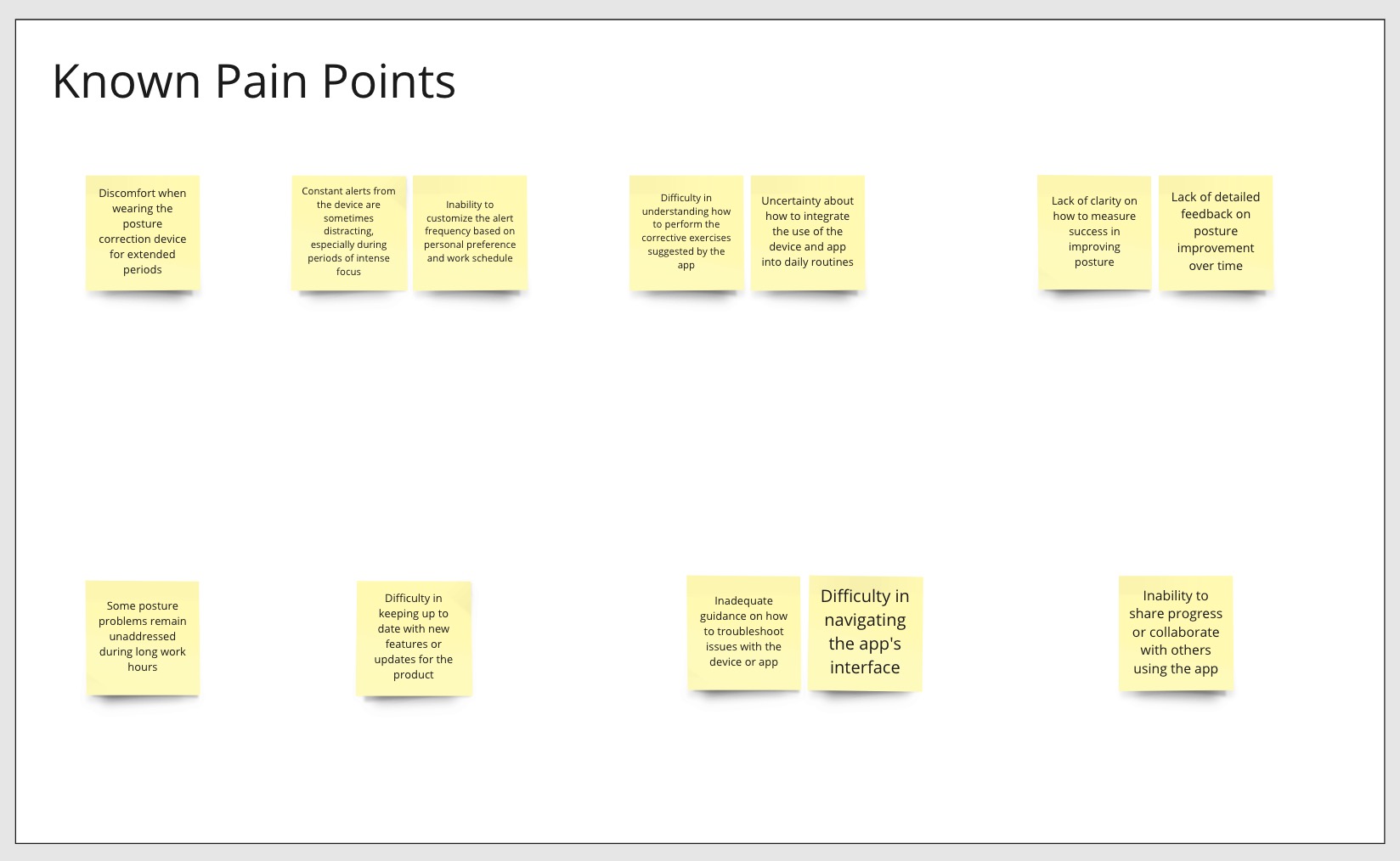
- Label the clusters: Once you’ve formed the clusters, create a label or theme for each group that summarizes its core idea or insight. This step helps in identifying trends and focusing on the most critical pain points.
- Prioritize and analyze: Evaluate the clusters and prioritize them based on their relevance and importance to the project. Discuss the findings as a team and identify the key customer pain points that need to be addressed.
- Define the problem statement: Based on the insights and priorities identified in the affinity mapping session, craft a clear and actionable problem statement that will guide your team throughout the project.
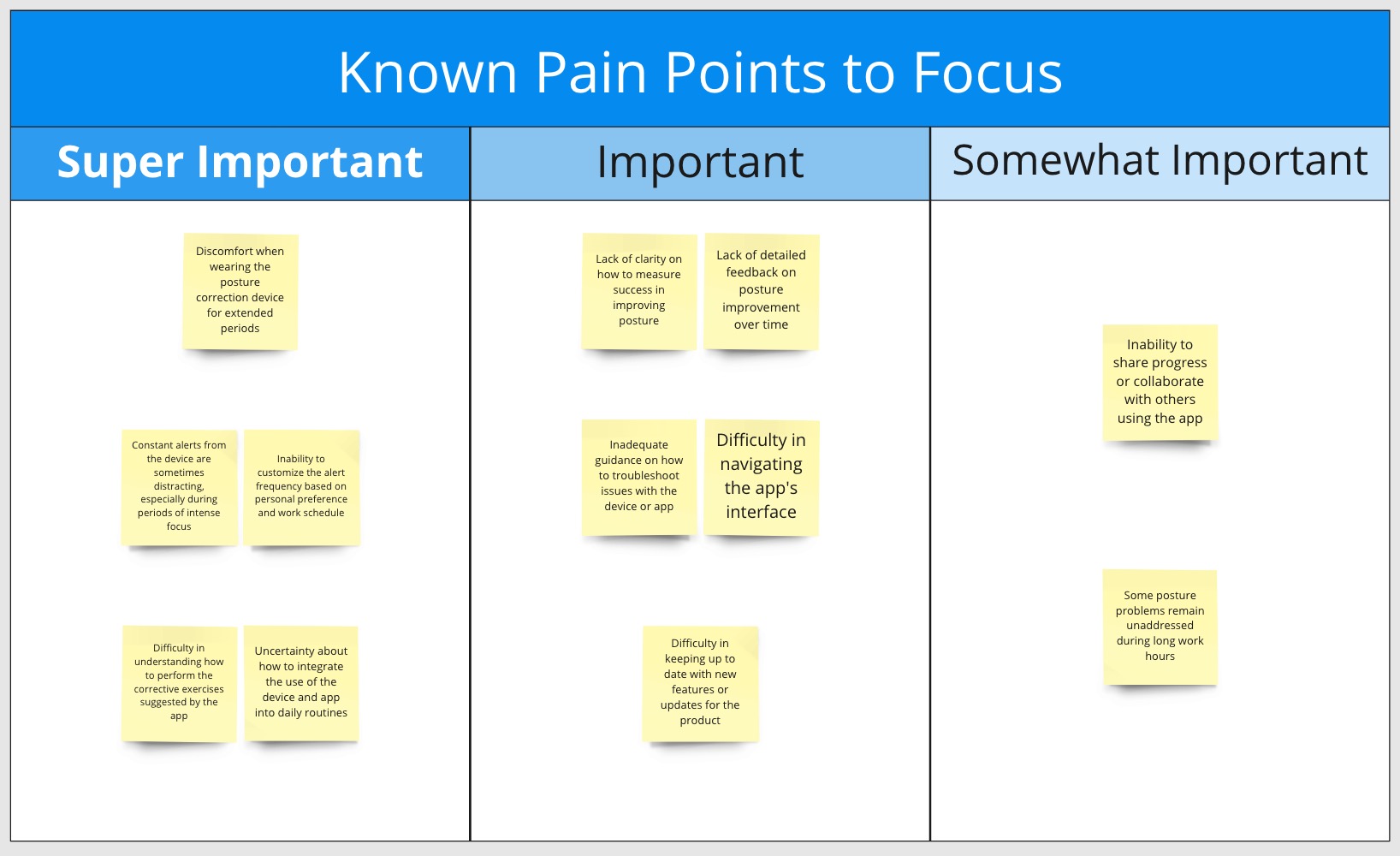
- Define the problem statement: Based on the insights and priorities identified in the affinity mapping session, craft a clear and actionable problem statement that will guide your team throughout the project.
During affinity mapping we also use “go broad to go narrow” technique which is an approach used to explore a wide range of ideas, insights, or solutions before narrowing down to a focused and refined set. This technique is helpful in the affinity mapping, as it encourages the team to consider multiple perspectives and possibilities (go broad) before converging on a smaller subset of customer pains (go narrow) which lead to a specific problem statement.
For your Affinity Mapping sessions you can use my Miro Design Thinking Toolkit.
Problem Statement
Before we attempt to solve a problem, the most important thing to agree on as a team is the customer problem we’re solving. If we don’t agree on the customer problem, or we see it differently, it is hard for any team to work well.
The problem statement aims to provide a clear, concise, and actionable description of the customer problem that the team needs to solve. A clear problem statement is a foundation for solution ideation. It acts as a starting point for generating ideas and solutions. It also guides the team’s creativity and innovation by keeping everyone aligned and focused on addressing the specific customer issue.
A template for a problem statement might look like this (based on how the problems are defined at Intuit):

More information and the working template can be found in my Miro Design Thinking Toolkit. Please feel free to copy for yourself and use as needed.
Ideal State
The Ideal State is a description of a future state where an important customer problem or opportunity has been solved to such an amazing degree, that the outcome seems almost impossible. For example, Whatsapp’s ideal state is “to connect people by providing a free messaging service for everyone”. Defining an ideal state statement helps the team envision the positive impact of their solution on the customer and guides their efforts towards achieving that vision.
To create an ideal state statement, follow these steps:
- Revisit the problem statement: Review the problem statement to ensure you have a clear understanding of the customer pain points and needs that have to be addressed.
- Envision the desired outcome: Imagine the best possible experience for the customer once the problem has been solved. Consider how their needs will be met, the pain points alleviated, and the overall experience improved.
- Focus on the customer: Ensure that the ideal state statement remains customer-centric, highlighting the positive impact on the customer’s experience and satisfaction.
- Write a clear and concise statement: Craft a statement that succinctly describes the envisioned ideal state for the customer. Use clear and straightforward language, and keep the statement focused on the customer’s needs and experiences.
An ideal state statement template might look like this:
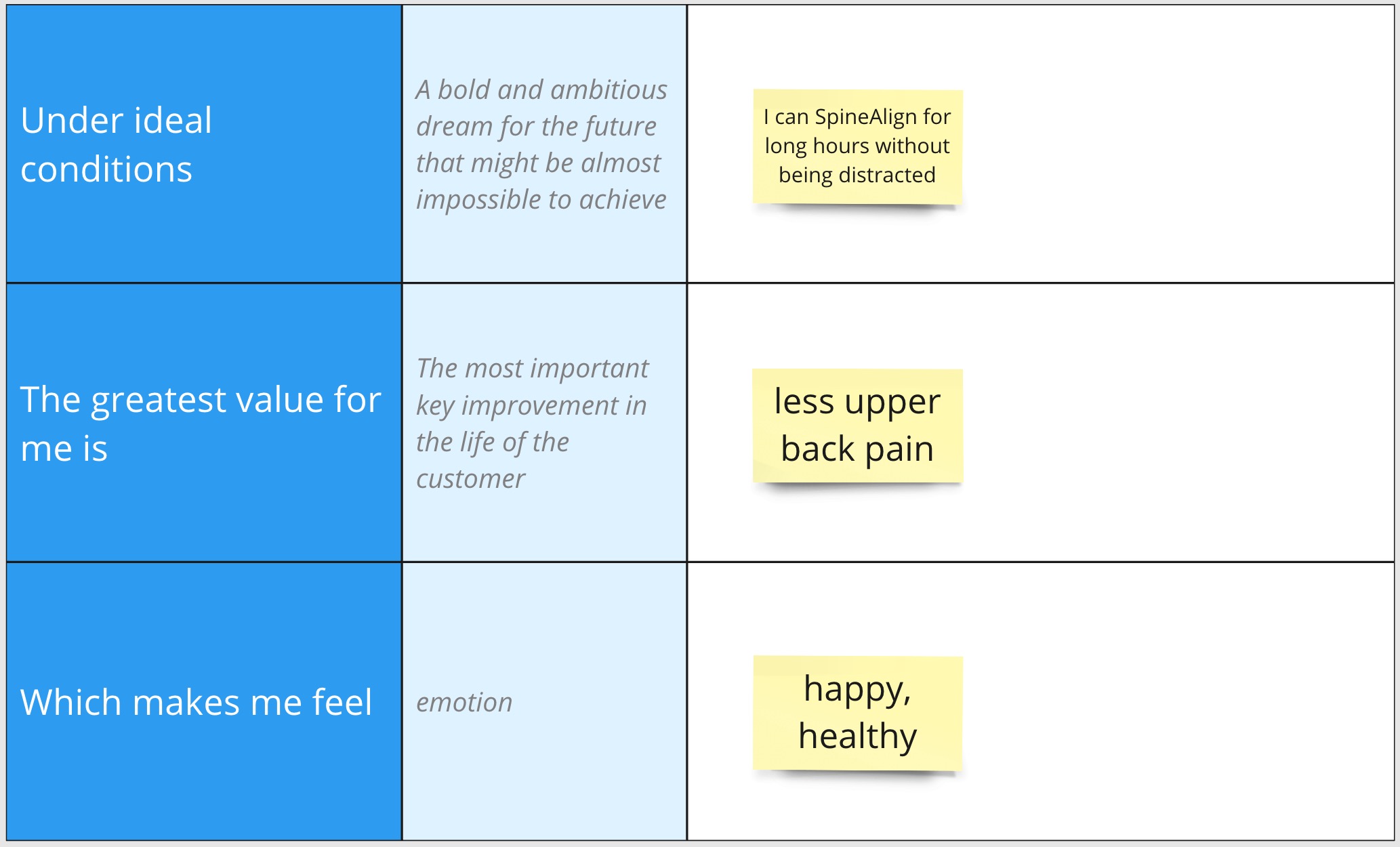
More information and the working template can be found in my Miro Design Thinking Toolkit. Please feel free to copy for yourself and use as needed.
Tips for Problem Statement and Ideal State
- Don’t fall in love with solution, fall in love with a problem
- When thinking about what stands in your customer way and the root cause, think about obstacles from the “barrier” perspective (missing systems, processes, resources etc. are solutions and not barriers)
- Emotion is very important – don’t miss that! It will give you ideas for target states
- Think Big and escape bias when thinking about ideal state
- There might be multiple ideal states for the problem
- Don’t think about limitations of time, money and resources when thinking about ideal state
- Avoid vague catch-all words such as “integration” or “personalization”
- Avoid describing a specific solution. Instead, focus on describing the customer benefit: what is the dramatic improvement in the customer’s life we hope to help them achieve?
- Imagine the complete opposite of the customer problem you identified. What does the world look like when the problem is perfectly solved?
- Think about how you will know when you have achieved an ideal solution?
Until next time…
 Michael Kalika's Blog