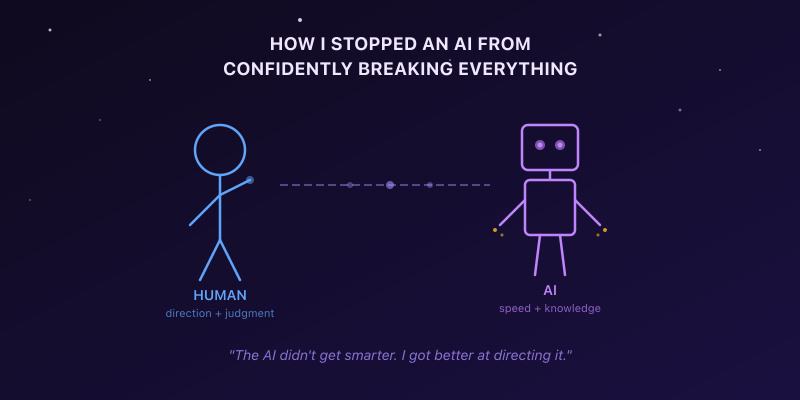
Here's something nobody tells you about working with an AI coding assistant: it's like hiring a brilliant junior developer who works at the speed of light, never sleeps, never complains - and will confidently remodel your entire kitchen when you asked it to fix a leaky faucet.
I know this because I spent weeks building https://stackingstarlight.com - an interactive web app with AI as my primary coding partner. The app has real-time animations, physics simulations, interactive diagrams with precise geometry, 3D rendering, and pixel-level image processing. None of that is my expertise. I'm software architect with mainly backend engineering experience over recent years. My day job is building fault-tolerant, low-latency systems that process massive amounts of data - the kind of systems where a missed edge case doesn't mean a misaligned label, it means lost transactions or undetected fraud. I can build web apps in React or Svelte, but I'm not a frontend specialist. I'm definitely not a mechanical engineer, a physicist, or a 3D graphics expert.
I built the app anyway - and early on, nearly half of all commits were fixes, rewrites, and redesigns. Things that went wrong because the AI and I hadn't figured out the rules yet.
But here's what made the difference: the instincts I brought from my actual domain - building complex systems, hunting for fraud, thinking adversarially about what can go wrong - turned out to be exactly the right toolkit for directing AI effectively. The patterns I use to catch bad actors trying to game a system are the same patterns that catch an AI assistant confidently generating broken code.
The fix rate dropped over time. Not because the AI got smarter, but because I got better at directing it. This is the story of how.
Chapter 1: The Kitchen Remodel Problem
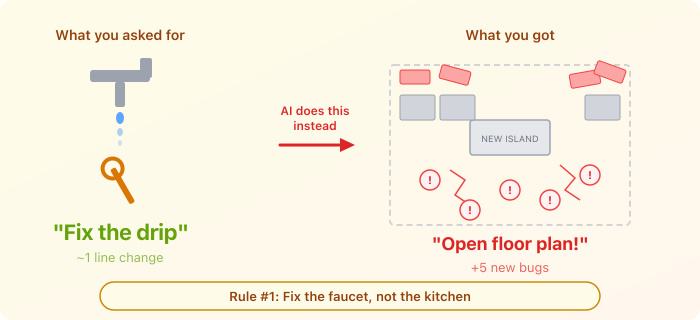
The first major disaster started innocently. I found a bug - one calculation was wrong. A single vector pointed in the wrong direction. A one-line fix.
What did the AI do? It rewrote the entire coordinate system. Changed the camera angle. Restructured the labeling. Modified the layering logic. Repositioned elements. All in one commit. The one-line fix was in there somewhere, buried inside a renovation that introduced five new bugs I didn't have before.
This wasn't a one-time thing. It happened again. And again. A slider felt sluggish? AI rebuilt the state management. A label was 10 pixels off? AI restructured the layout system.
I started calling this the Kitchen Remodel Problem: you ask AI to fix a dripping faucet, and it knocks out a wall because "while I'm in here, the kitchen could really use an open floor plan."
Why AI does this: AI models are biased toward comprehensive, "elegant" solutions. When they see a bug, they're inclined to look for a deeper structural problem - because in training, the "best" answers are often the ones that address root causes. But in a real codebase, especially one with visual output, every change has side effects. Bundling ten changes together makes it impossible to tell which one broke things.
The fix: I added a rule - minimal fix first. Fix only what's broken. Verify it works. Then, and only then, propose bigger changes as a separate step. With my approval. Not bundled in.
This single rule probably saved more time than any other.
Chapter 2: "Looks Good To Me" (It Did Not Look Good)
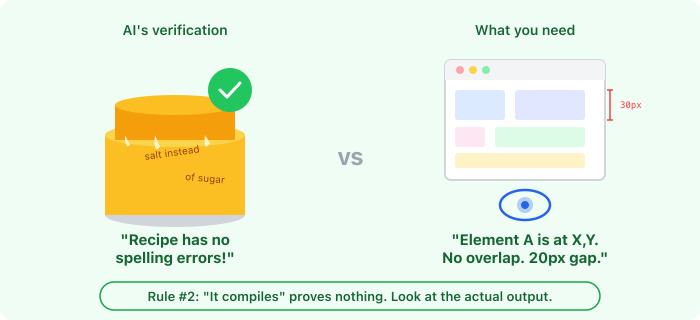
After making visual changes - layout adjustments, animation tweaks, diagram positioning - the AI would report back: "The layout looks correct and the build succeeds."
Reader, the build succeeding means exactly one thing: the code has no syntax errors. That's it. It tells you nothing about whether a box is off-screen, a line is drawn backwards, colors are inverted, or an entire component is invisible on mobile.
I discovered this the hard way when the AI changed some math and proudly announced everything was working. I opened the app. The entire visualization was broken. Elements were mispositioned. The layout was sideways. But hey - the build passed!
This was my "trust but verify" moment. I realized that with visual code, "it compiles" is the lowest bar imaginable. You wouldn't accept "the recipe has no spelling errors" as proof that the cake tastes good. Same principle.
So I added another rule: screenshot before, screenshot after, describe what changed. Not "it looks fine" - but specific, falsifiable observations. "Element A is at position X. Element B is 15 pixels below it. They don't overlap. The line extends from the top-left corner to the target circle."
Why "falsifiable"? Because if you can't be wrong, you're not actually verifying anything. "The layout is correct" can never be proven false just by reading it. "The button is 20px from the right edge" can.
I later extended this to require mobile testing too, after a feature looked perfect on desktop and was completely broken on phone screens. The AI had no idea - it never looked.
The principle generalizes beyond visual code: whatever your output medium is - UI, data reports, API responses, ML model predictions - make the AI demonstrate correctness in that medium. If users will see a dashboard, check the dashboard. If users will get an email, look at the email. "The code is right" is not evidence that the result is right.
Chapter 3: The Armchair Physicist
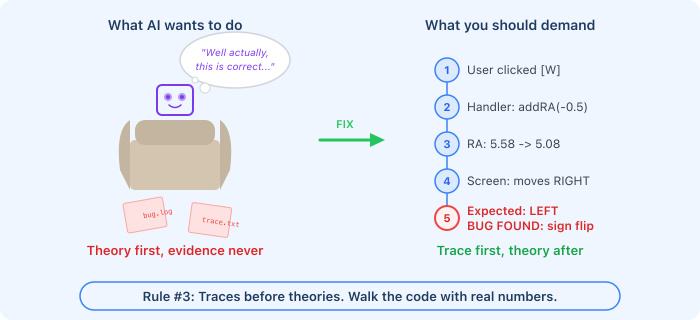
One day I reported: "I click this button and the thing moves the wrong way."
The AI's response? A three-paragraph theoretical explanation of why the behavior was actually correct, citing coordinate system conventions and mathematical properties.
It was wrong. The button handler had a sign flipped. A simple trace through the code with actual values would have caught it immediately. But the AI skipped the boring diagnostic work and jumped straight to a confident, eloquent, completely incorrect theoretical justification.
This happened twice on the same bug. The first time, the AI theorized instead of tracing and missed a swapped value. After fixing that, it declared victory without testing the actual sequence of steps I'd described. There was a second problem in the workflow - but the AI only tested the individual function it changed, not the full user flow.
I call this the Armchair Physicist pattern: AI would rather explain why the universe works the way it does than check whether the code actually does what it should.
The fix: I wrote a mandatory diagnostic protocol. Before offering ANY explanation, the AI must:
- What did the user actually do? (which button, which sequence)
- What code runs in response? (find it, read it)
- What values change? (compute them - actual numbers)
- What does that produce on screen? (trace through rendering)
- Does step 4 match what should happen?
Only after completing this trace can the AI offer an opinion on whether the behavior is correct or buggy.
And critically: if I say "I did A, then B, then C broke" - the AI must test A->B->C as a sequence. Not just C in isolation. Bugs love to hide in state left behind by earlier steps.
The principle for everyone: AI is dangerously good at generating plausible explanations for wrong behavior. The more confidently it explains, the more skeptical you should be. Demand the boring trace with real numbers before accepting the elegant theory.
Chapter 4: The Documentation Trap
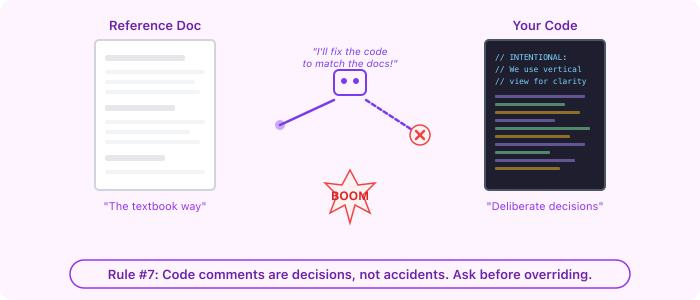
My project had detailed reference documents explaining how the system should work in theory. The code had comments explaining deliberate design choices that differed from the theory - for good reasons. (Sometimes you simplify for clarity, or choose a different approach that works better for the specific use case.)
The AI saw the mismatch between docs and code, assumed the code was wrong, and "fixed" it to match the docs. This broke the deliberately-chosen design. Everything went sideways.
This is a subtle but important trap: AI treats documentation as authoritative by default. If you give it a reference document and the code disagrees, it will "correct" the code. But in a real project, code comments often represent decisions someone already made - intentional deviations from the textbook approach.
The fix: When docs and code disagree, the AI must ask which is authoritative instead of silently "correcting" anything. The code might be wrong. The docs might be outdated. But the AI shouldn't decide on its own.
For anyone working with AI: Be careful about the reference material you provide. Make it clear what's prescriptive ("the code MUST do this") versus descriptive ("this is how the concept works in general"). Otherwise, the AI may override your intentional design choices to match the textbook.
Chapter 5: The Guess-and-Check Loop
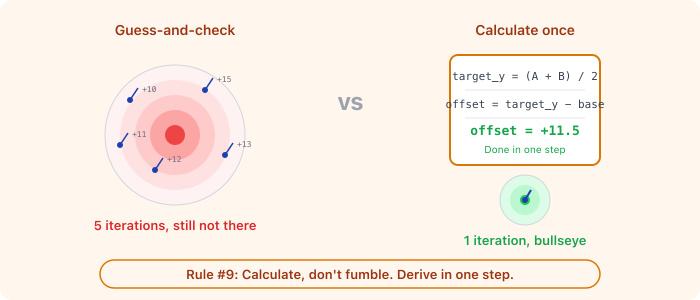
Positioning a label in a diagram. The AI needed to set an offset value. It tried +10. Nope, too high. Tried +15. Too low. Tried +12. Close but not quite. Tried +13...
Five iterations of blind guessing. Meanwhile, the label's position was a simple function of two known coordinates. You could solve for the exact offset with one line of arithmetic.
This drove me up the wall - not because it was a big deal in isolation, but because it revealed a pattern. The AI would rather guess-and-check than think. It's faster for the AI to generate five attempts than to derive one correct answer. But it's not faster for the human who has to review each attempt.
The same pattern showed up in testing. The AI would plug values into a formula, get some number out, and write "expected: [that number]" in the test. But that's circular - you're testing that the formula returns what the formula returns. The question is whether the formula is right.
The fix: When dealing with computed values, derive first, then verify. Start from what the correct real-world behavior should be ("moving only the horizontal control should produce only horizontal motion on screen"), then check if the code produces that. If it doesn't, the code is wrong - don't rationalize the output.
The principle: If a value can be calculated, calculate it. If a behavior can be predicted from first principles, predict it. Then compare. AI's tendency to generate-and-check is fast but unreliable. Your tendency to think-then-verify is slower but catches real bugs.
Chapter 6: Building a Castle on Sand
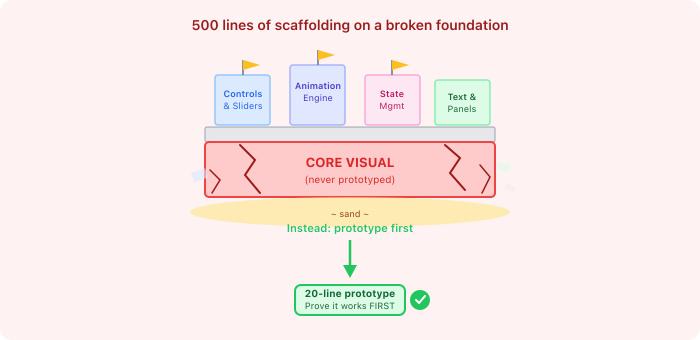
In one memorable episode, the AI built an entire multi-phase animated visualization. It had state management, animation controls, speed settings, explanatory panels, and interactive sliders. A genuinely impressive amount of code generated in a short time.
One problem: the core visual - two shapes that needed to interlock visually - didn't work. The rendering technique it chose fundamentally couldn't produce the visual effect needed. The shapes just overlapped awkwardly. No amount of tweaking could fix it.
Everything built on top of that core visual? Thrown away. The controls, the animations, the state management, the text - all of it was scaffolding around a foundation that didn't work.
The fix: I added a prototype-first rule. Before building any complex visual component, identify the single hardest rendering challenge. Build a minimal prototype - even just 20 lines - that proves the approach works. Only then build the full system.
This also comes with a corollary: research before inventing. Check how other people solved the same visual problem before designing a custom approach from scratch. The AI often invents novel (and broken) solutions to problems that have well-known answers.
For anyone building with AI: This is probably the most universally applicable lesson. AI can generate enormous amounts of code very quickly, which makes it tempting to build big. But speed of generation is not speed of progress. A 500-line system built on a flawed foundation is negative progress - it's faster to have nothing than to have something you need to delete.
Always ask: "What's the riskiest assumption in this plan?" Then test that assumption first, with the smallest possible experiment.
Chapter 7: Bringing a Security Mindset to AI Collaboration
Here's where my actual background kicked in.
In fraud prevention, you can't put all your defenses in one place. You need multiple layers that catch different things at different times. I use three types of controls:
- Blocking controls - they run in real-time when someone tries to do something, and they can stop the action before it happens. Fast, focused, always on. They're the bouncer at the door.
- Monitoring controls - they run in the background while someone is active, watching for patterns of suspicious behavior. They don't slow anything down, but they're always watching. They're the security cameras.
- Offline controls - they run later, in batch, when nobody's around. They do the deep analysis, the cross-referencing, the retrospectives. They're the detective reviewing the footage the next morning.
This layered approach exists because of a fundamental tension: you want maximum security, but you also can't make the experience frustrating by stopping and questioning every single action. So you distribute your defenses - some block in real-time, some watch silently, some analyze after the fact.
I realized the same tension exists when directing AI. You want maximum code quality, but you can't manually review every line in real-time - you'd never ship anything. So I built the same layered defense system, except instead of catching fraudsters, it catches bugs.
The Three Layers
Layer 1: The Bouncer (always-on protocol in the instruction file)
My project's instruction file has a protocol section that loads into every single AI conversation. It's lightweight - it doesn't slow the AI down or bloat the context - but it sets non-negotiable rules: every bug fix needs a root cause analysis, every visual change needs screenshots, every diagnosis needs a code trace before a theory. This is the equivalent of the blocking control. It runs on every action, every time. No exceptions.
Layer 2: The Security Camera (auto-triggered skill)
I created a detailed "bug post-mortem" skill - a structured methodology with 5 phases: root cause analysis (with 5-Whys), detection gap audit, contradiction analysis, preventive implementation, and verification. Here's the clever part: I don't invoke it manually. The AI auto-triggers it whenever it detects it's doing debugging work, investigating errors, or implementing fixes. It notices the context and activates itself.
This is exactly like an async monitoring system - it doesn't block or slow down normal work, but the moment suspicious activity is detected (in this case, "a bug is being fixed"), it kicks in with the full investigation protocol. The developer doesn't have to remember to run it. It just watches and activates.
The detection gap audit is particularly influenced by security thinking. Just like a fraud team asks "why didn't our transaction monitoring catch this?", the post-mortem asks for each defensive layer - type system, linting, unit tests, integration tests, code review, CI - should it have caught this bug? If yes, why didn't it? Then it requires fixing the gap, not just the bug.
Layer 3: The Detective (on-demand slash command)
For deeper analysis - reviewing someone else's fix, doing a retrospective on a past incident, or when I just want the full protocol applied to something specific - I have an explicit /postmortem command I can invoke manually. It's the offline analysis: deliberate, thorough, on my schedule.
There's also an /add-bug-pattern command that records new bug patterns into the project's instruction file - so the bouncer (Layer 1) learns from every detective investigation (Layer 3). The system strengthens itself over time.
How the layers reinforce each other
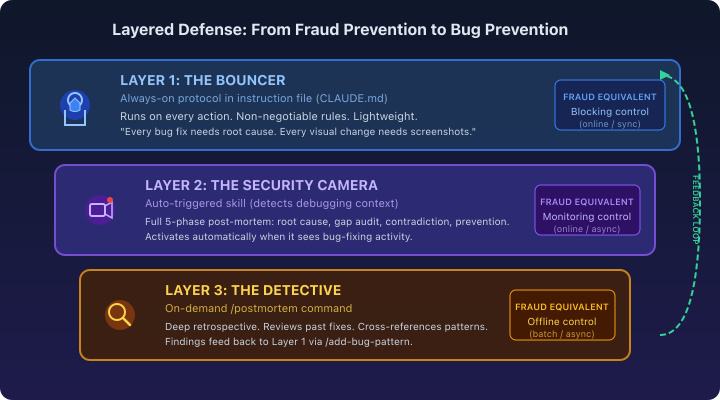
The beauty of this system is the same as in fraud prevention: no single layer is perfect, but together they're much harder to slip through. The bouncer catches the obvious stuff every time. The security camera catches the subtle stuff automatically. The detective catches the systemic stuff on demand. And the detective's findings feed back into the bouncer's rules - making the whole system smarter over time.
For anyone building with AI: You don't need a security background to use this pattern. Just ask yourself: what should happen automatically on every AI interaction? (Layer 1 - put it in your instruction file.) What should trigger when specific conditions are detected? (Layer 2 - create skills with good trigger descriptions.) What do I need on demand for deeper analysis? (Layer 3 - create explicit commands.) The layered approach means you get quality without friction - the same tradeoff every security team in the world is trying to optimize.
Chapter 8: The Instruction File That Grew Teeth
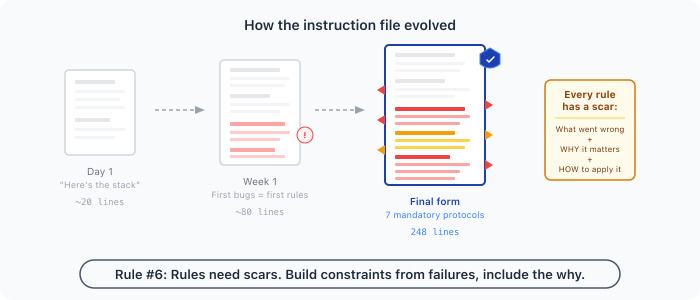
My project's instruction file started as a short project description: here's the tech stack, here's how to run it, here are the main files.
By the end? It was a 248-line operating manual with seven mandatory protocols.
Every rule in that file has a scar behind it:
| What went wrong | Rule that was born |
|---|---|
| "Build passes" treated as visual verification | Screenshot before/after with specific observations |
| Theorized about bugs instead of tracing code | Mandatory code trace with real values before any explanation |
| One-line fix became a full rewrite | Minimal fix first, verify, then propose more |
| "Looks correct" with no evidence | State expected value, state actual value, compare |
| Wrote test plans but never ran them | Writing tests isn't credit - only running them counts |
| Built full system on unproven technique | Prototype the hardest part first |
| Hot animation path triggered full UI rerenders | Framework-specific rules about forbidden patterns |
Here's the thing I want to emphasize: none of these rules were written on day one. I didn't sit down and predict all the ways the AI could fail. I let it work, watched what went wrong, and added rules iteratively - like writing regression tests for a human collaboration.
And every rule includes the why - the story of what went wrong. This is critical. A rule without context ("always take screenshots") gets followed mechanically. A rule with context ("always take screenshots because last time we skipped this, the entire visualization was broken and we didn't notice for three commits") gets understood. The AI can then apply judgment in new situations that the specific rule doesn't cover.
This is another security principle, by the way: good security policies aren't just rules, they're rules with rationale. People (and AIs) who understand why a control exists will apply it correctly in ambiguous situations. People who only know what the rule says will follow it to the letter and miss the spirit entirely.
Chapter 9: You Don't Need to Be an Expert in What You're Building
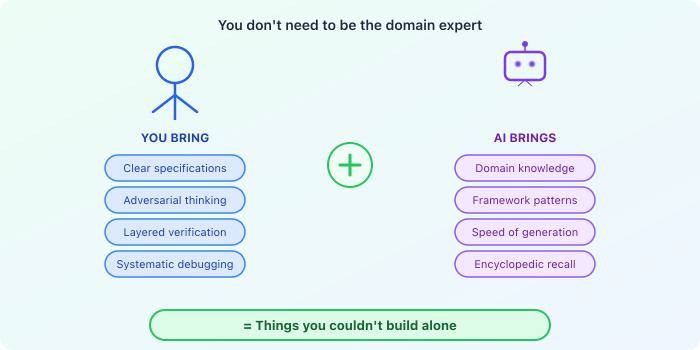
Let me be direct about something: I built an app with 3D graphics, physics simulations, and complex geometry - and I'm none of the things that sounds like. I'm not a frontend specialist. Not a 3D graphics expert. Not a mechanical engineer. Not a physicist.
What I am is someone who knows how to:
- Write clear specifications - years of designing complex backend systems taught me to document requirements precisely, with explicit edge cases and test criteria
- Think adversarially - my fraud-fighting background means I automatically ask "what could go wrong?" and "how would I exploit this?" about every system, including AI output
- Build layered defenses - I know that no single check catches everything, so I design systems with multiple independent verification layers
- Trace through systems methodically - when a distributed system misbehaves, you don't theorize, you trace the request through each hop with actual timestamps and values
These skills transferred directly. The domain was unfamiliar, but the meta-skills - specification, verification, adversarial thinking, systematic debugging - were exactly what was needed to direct AI effectively.
The AI brought the domain knowledge I lacked. It knows React patterns, 3D math, animation techniques, and SVG rendering. What it lacks is judgment: when to stop, what to verify, when its own output is wrong. That's what I provided.
For anyone hesitant to build outside their expertise: Your engineering fundamentals transfer. If you can spec, verify, and think critically, you can direct AI to build things you couldn't build alone. You don't need to be the expert - you need to be the one who knows when to trust the expert and when to check their work.
The Cheat Sheet
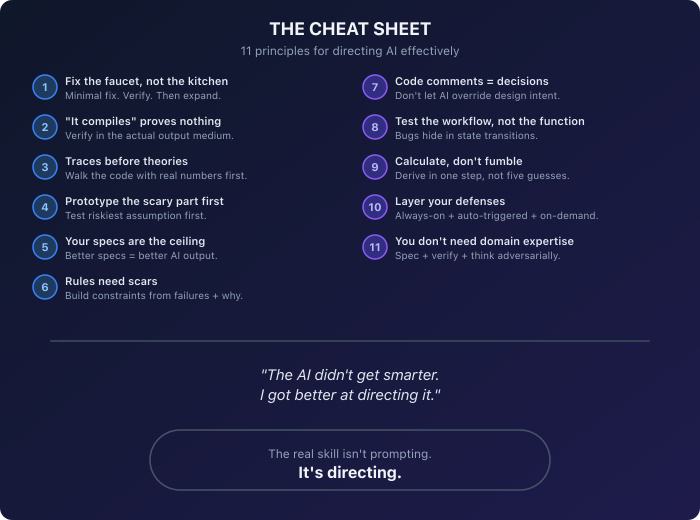
If you take nothing else from this, here are the principles that transfer to any project:
- Fix the faucet, not the kitchen. Demand minimal fixes. Verify. Then discuss scope expansion.
- "It compiles" proves nothing. Make AI demonstrate correctness in the actual output medium - screenshots, real values, actual behavior.
- Traces before theories. If the AI can't walk the code path with real numbers, its explanation is a guess wearing a suit.
- Prototype the scary part first. Find the riskiest assumption and test it with the smallest possible experiment before building anything around it.
- Your specs are the ceiling. AI output quality scales with input specification quality. Invest in clear, structured requirements with concrete test cases.
- Rules need scars. Build your instruction file iteratively from actual failures. Every rule should have a why.
- Code comments are decisions, not accidents. Don't let AI "fix" intentional design choices to match reference material without asking.
- Test the workflow, not the function. Bugs hide in state transitions between steps. If the user did A->B->C, test A->B->C.
- Calculate, don't fumble. If a value can be derived, derive it in one step. Trial-and-error wastes everyone's time.
- Layer your defenses. No single check catches everything. Build always-on rules, auto-triggered analysis, and on-demand deep investigation. Make the layers feed back into each other.
- You don't need to be the domain expert. You need to be the one who specs clearly, verifies relentlessly, and thinks adversarially. AI brings the domain knowledge. You bring the judgment.
One Last Thing
Working with AI isn't magic, and it isn't autopilot. It's more like pair programming with someone who types 100x faster than you, has encyclopedic knowledge, no short-term memory, and an irresistible urge to refactor things.
Your job isn't to write the code - it's to see clearly: to know what correct looks like, to verify what's actually on screen, to think about what could go wrong before it does, and to course-correct quickly when things drift.
The 42% fix rate I started with? It dropped over time as the rules accumulated. The AI didn't get smarter - I got better at directing it.
That's the real skill. Not prompting. Not expertise in every domain you touch. Directing. And if you've spent your career building systems that need to be reliable, secure, and correct - congratulations, you already have the hardest part down.